Once you have modelled your stress tests with JMeter (that's another story that deserves its own post), maybe you want to launch them in a non-interactive way from your continuous integration server.
For doing so, you just need to launch JMeter with the non-interactive mode:
./apache-jmeter-2.6/bin/jmeter.sh -t my-test-plan.jmx \
-l my-test-plan-2012-16-09.jtl -n
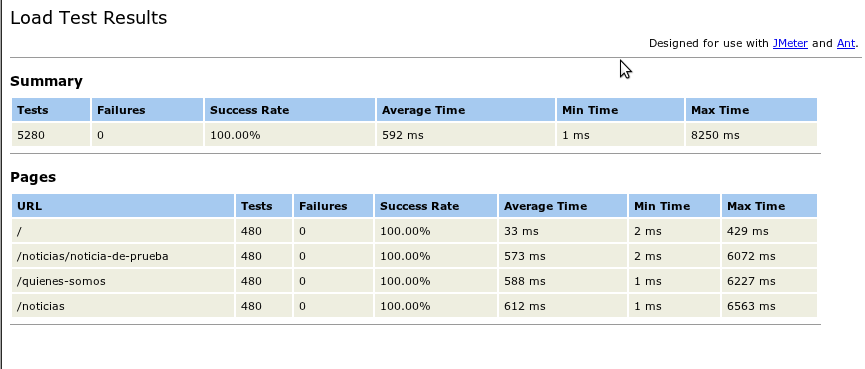
This commands launch the test plans, but the output file is XML. How could I send this as a report to the QA team or the management people? Just launch:
xsltproc ./apache-jmeter-2.6/extras/jmeter-results-report_21.xsl \
my-test-plan-2012-16-09.jtl > report-2012-16-09.html
The result will be an HTML file which is rendered as the image attached.
Hola penyaskito:
Hola penyaskito:
Qué bien quedarían usos reportes en integración continua ejecutados todas las noches tras los últimos commits del día.
Y si además incluyes el despliegue automatizado, mejor aun ;)
Me han dicho que todo lo que necesitas para eso lo tienes resuelto en http://clinkerhq.com ;)
Un abrazo crack!
Gridinit
For real time reporting and distributed jmeter tests across the globe we'd love you to try gridinit.com
Me lo apunto para ponerlo en
Me lo apunto para ponerlo en práctica. Hasta ahora las pruebas de rendimiento las hacía jugando con Apache AB. Un día de estos me debería currar un artículo de optimización de Apache, MySQL, Wordpress, he conseguido bajar bastante el tiempo que tarda en servirse las páginas aunque no estoy del todo contento. Los recursos estáticos enlentecen mucho los portales y estoy pensando en usar Varnish o incluso un CDN.
¿Alguna experiencia al respecto?
Buenas Fco Antonio,
Buenas Fco Antonio,
Actualmente acostumbro a servirlos con Varnish, y jugando bien con los TTL y los expires. A ver si pronto puedo escribir sobre ello. Si tienes acceso a un CDN seguramente sea lo mejor y delegar los recursos estáticos. Muchas veces además no sólo afectan al sistema en sí, sino a la percepción del usuario por la limitación de conexiones simultáneas de los navegadores.
Gracias por tu comentario.
Qué formal te pones al
Qué formal te pones al responderme por poner mi nombre completo :P.
En principio en lo que tengo montado he jugado con optimización de MySQL, pendiente hacerlo en el Postgre, luego Apache+APC (que mejora bastante el rendimiento), también módulo Modspeed y luego en los Wordpress jugar con plugins de optimización, carga retrasada de imágenes y otros. Dentro de un tiempo vamos a migrar el servidor y estoy pensando si optar por nginx o seguir con Apache; en cualquier caso montaría Varnish a ver qué tal se comporta. Con los CDN no tengo experiencia y hay que pagar por el servicio, por lo que si Varnish me da un rendimiento aceptable, me lo quedo y de paso bicheo la configuración. Ya te contaré.